
Idea-generating
For this production piece I wanted to use Blender and the 360-camera view that I learned to create 300 frames, roughly a 10-second-long animation that transitions from one scene to another. The idea that sounded the most promising that will allow me to not only showcase my current Blender skills but also improve on them further was the following. The first scene will be a shop specifically selling globes, with different sceneries inside them, to continue with that idea and to make sure the two scenes are connected the second scene will be inside one of the globes. This is to not only connect the two scenes but to also create a storytelling experience for the viewers. With this being a 360 view I had to make sure that everything is thought of since the viewers have the freedom to move the camera view whichever way they want, so making sure that there is something in every direction is critical and it is also why I choose the scenes to be enclosed, the first in a closed off shop and the second in a globe.
After deciding on the two scenes that will be created I went ahead and created a mood board using PowerPoint to help visualise how the two scenes will look and the kind of feel I want them to have. For the shop scene I looked at the different elements that will be needed such as a stand for the main globe, lamps and shelves and the different ways that could be modelled in blender, as well as some colour pallets. After which I had to look at the architectural side of shops so that I can get an idea where to place things in blender, for that I not only looked at existing blueprints of shops but also sketched a rough one out myself to incorporate my idea in the same style as the shop blueprints that was helpful later when going into blender.
For the second scene I wanted to have a more fantasy, magical feel to it so I looked at more cosy, fantasy houses that had that cosy feeling to them as well as some colour schemes that once again fit that magical feel, for this mood board I did not any sketches since the images on the mood board gave me a good idea of the kind of look I wanted to do for the cosy house.
Story Board and Animation
After having an overall visual idea for how I want the two scenes to look and the kind of feel I want them to have the next step was to make a story board. Due to the fact that this is an animated sequence a storyboard would be helpful not only to once again visualise how the frames and time will be split but it’s also a good reminder for what comes next, what has to happened after and also use it as a reminder to keep things well spaced out.
For the storyboard, I sketched out the two scenes as well as the transitions that will be used in premier (which are portrayed by the black squares) like in the beginning, middle before the scene changes to the next one and at the end where once again the scene changes from one to another. Due to the scenes being a continuous animation that uses up all frames, for the storyboard I have used the starting frames (1 and 151) and the end frames (150 and 255) only with a continuous line between them to represents that this scene and animation is happening throughout all of the frames in between them.
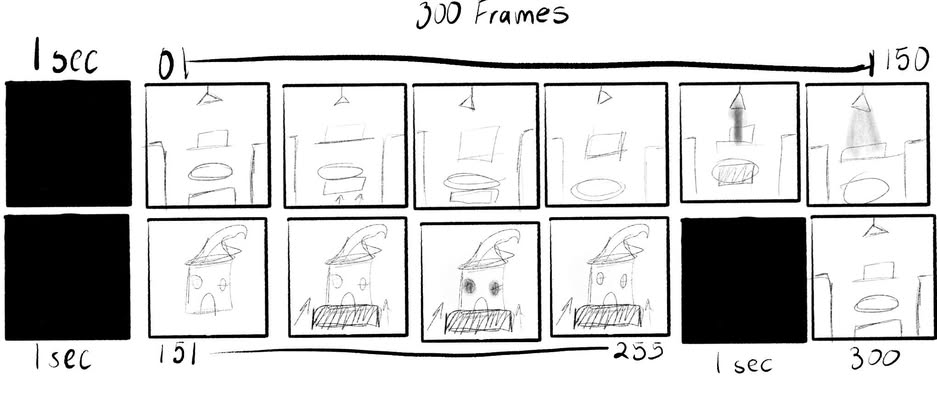
For the end I have left 5 frames and a transition to transport the viewers back to the first scene since they started in the shop and the animation finishing back in the shop is a more likely finish to the animation rather than leaving the viewers in the fantastical second scene that would leave the viewers confused.
For the first scene, the animation will start with a transition that will than let the viewers see the shop, from that start to the end of the scene the camera will be slowly moving forward towards the stand with the main globe in the middle, the lights will flash towards the middle of the scene, after the camera gets to the front of the stand there will be another transition that will go into the second scene.
For the second scene the camera will once again go forward more and more until it gets close to the house and the lights from the window will once again also flicker and after that happens in the next 10-20 frames there will another transition that will return the viewers to the first scene and that is how the animation will end.
Blender
Blender was used to create the two scenes and Adobe Premier was used to add the transitions and to stitch together the two scenes together creating the final look for the animation that is uploaded to YouTube.
For the first scene, the elements that were modelled to help make the shop scene feel more realistic were the desk, vase with flowers, the shelves full of globes to show that the shop focuses only in globes and the most important part is the stand with the main globe in the middle of the shop that the camera moves towards. There are similarities with the mood board from before since that inspired the designs as well as the colours for the shop. The reason I ended up choosing the purple colour schemes is because I wanted the shop to feel connected and that colour scheme is different hues and shades of the same colour so that helped with making the scene feel more well-rounded.
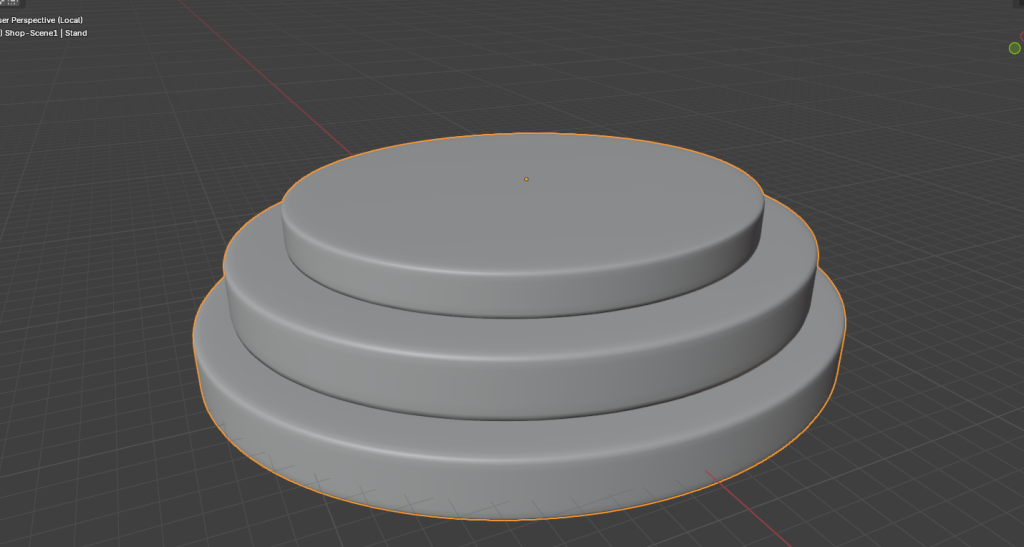
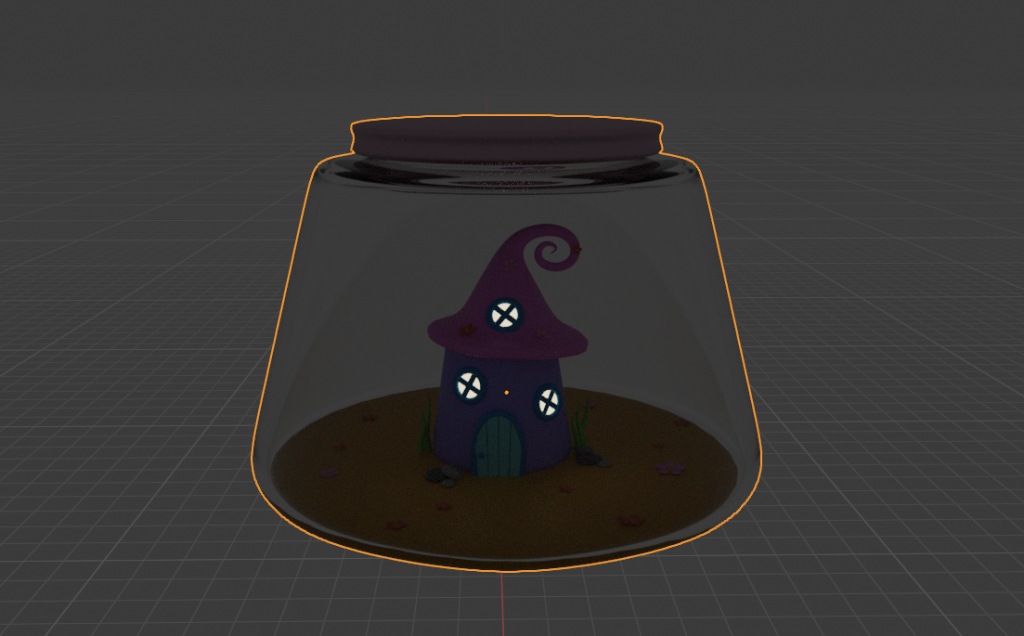
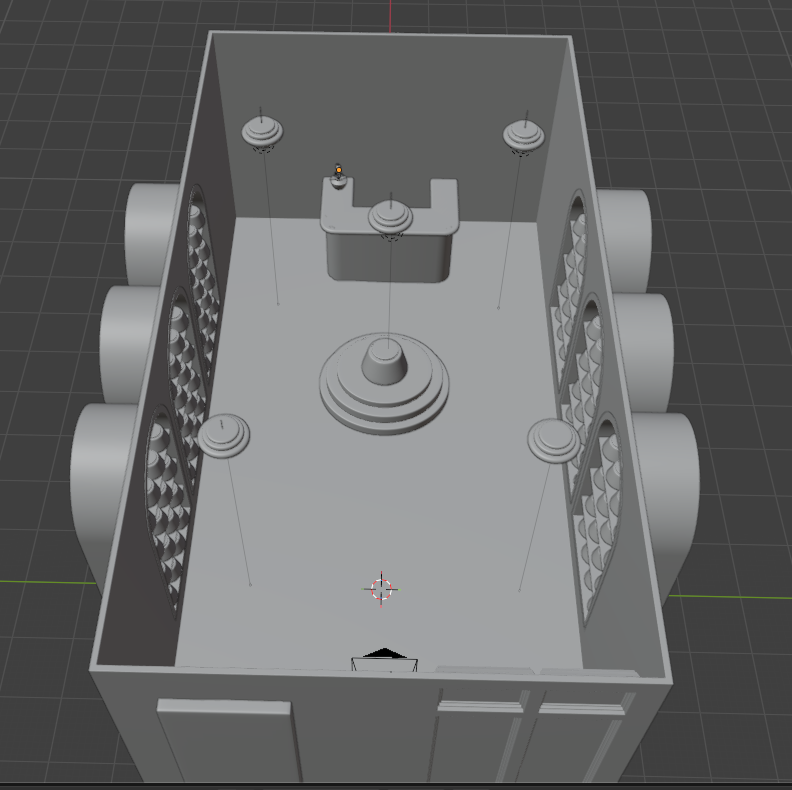
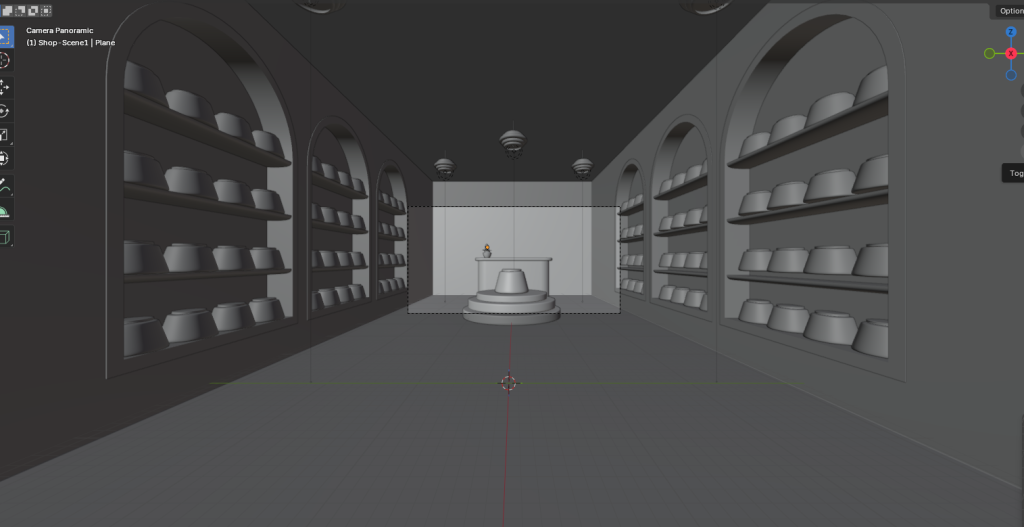
(Screenshots of the modelled shop scene in blender, top view, stand, jar with the house inside and the camera view inside the shop.)
For the second scene inside the globe the modelling was much simpler since it didn’t require many elements other than the house and glass globe that it’s in. The colour pallet used for scene is a lot more random and brighter since it’s supposed to be a fantasy unrealistic kind of feeling and the unnatural colours help with creating that feeling in the viewers.
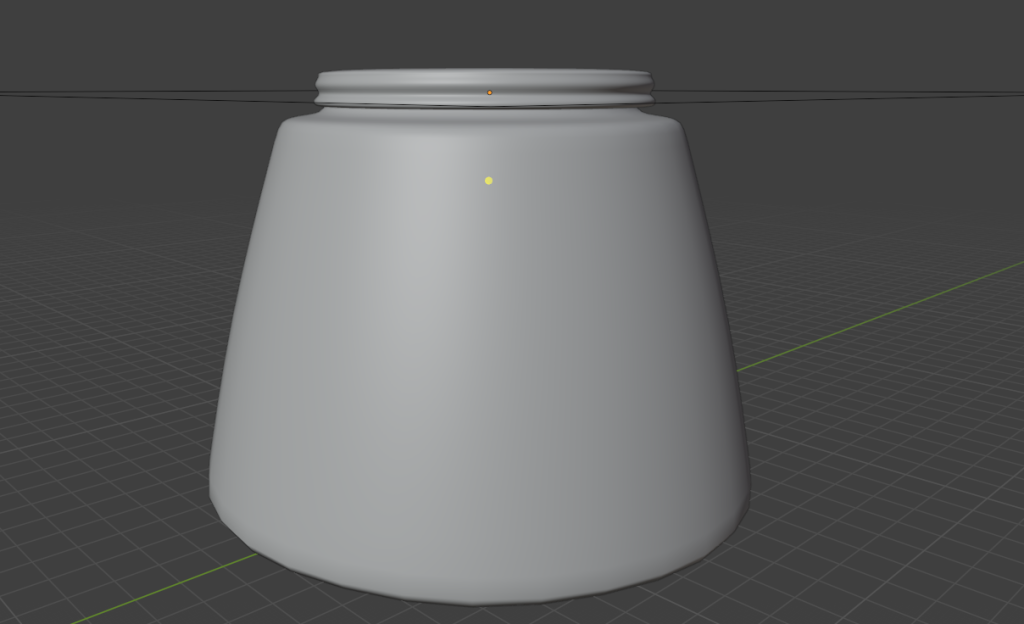
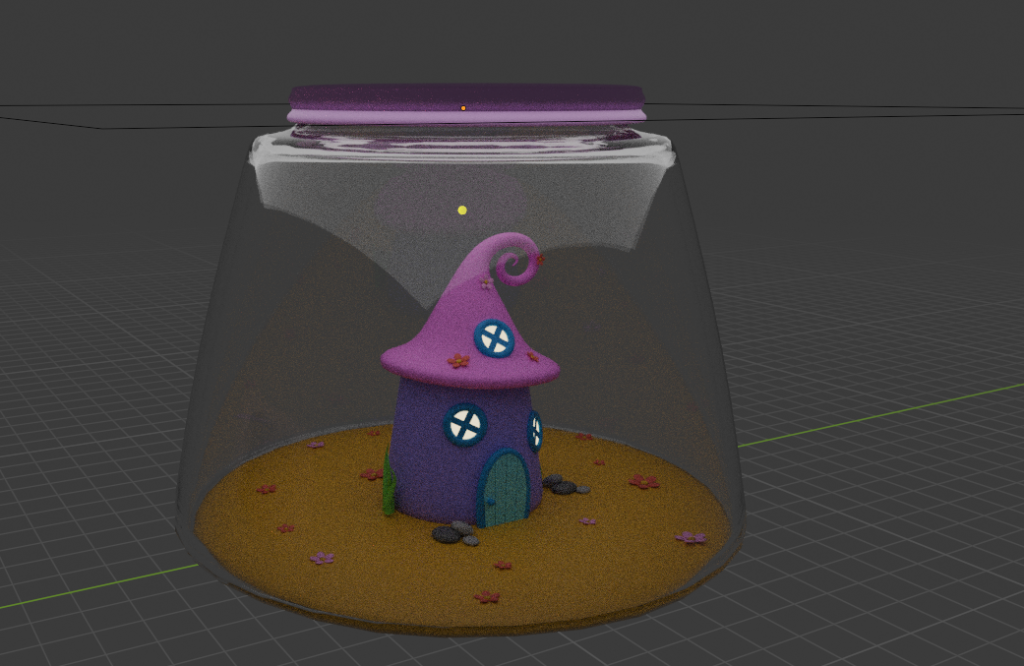
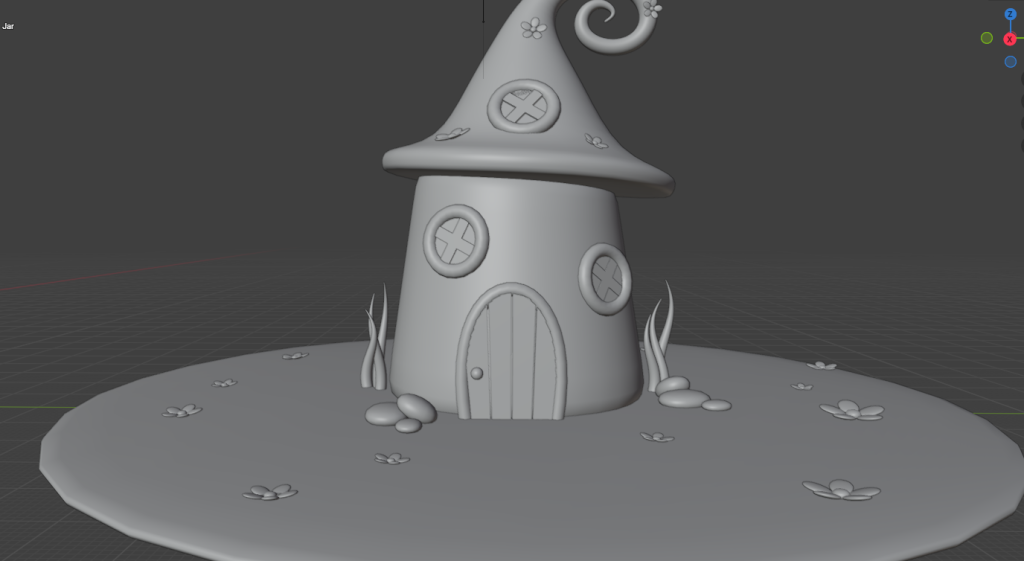
(Screenshots of the modelled house/globe scene in blender, mainly the jar with and without texture and the house inside of it.)
360-viewing experience
Since this is a 360-viwerig experience the viewers and how their experience will be made positive were a main factor for many of the decisions made in this project. Such as making sure the camera is moving slow and steady rather than suddenly and quick so that the viewers have a smoother experience. Also, with the freedom that viewers must look around the scenes I had to think how to direct the viewers’ attention to a curtain point of the scene that needed their attention to be on what’s happening.
For the first scene to make sure that the viewers’ attention is on the main globe rather than looking away, I made the light flicker in the middle right above the stand, as well as the lamp above the stand to sway left to right, this is so that the viewers’ attention is solely focused on the main globe since that is where the transition will take place. The reason that viewers can move the camera freely is also why I created the shop scene and the house scene to be closed off so that the viewers can still turn and look around but only to a certain extend. Moreover, the shop scene is fairy plain to not only create a smoother experience but to also make sure the viewers don’t have many distractions and the distraction they could have like the case and desk are placed behind the main globe so that the camera is still facing that way. The final way that makes sure that viewers are focused on the main globe is the material difference, since the shop scene is in a specific colour scheme and the house inside the globe is in a lot more bright colours the sharp contrast that it creates inside the shop also helps grab the viewers’ attention to the stand.
Moving onto the house scene, for this part of the experience once again premier was used to transition into the scene more smoothly for the viewers, the camera is placed further away since it will be moving forward throughout the scene slowly, since this part of the animation is mainly bare and plain there isn’t a lot to distract the viewers since the main model, the house, is the only thing in the scene, but still to make sure that the viewers are facing the house the lights from the windows flash towards the middle of the scene. After making sure the viewers are facing the right way the camera goes forward until at the door and that is when the final transition is made that smoothly send viewers back to the shop and that is where the animation ends.
Outcome
Throughout the whole project the decisions made were to make sure the viewers have a good experience with the 360-vieweing, however due to technical difficulties with premier rendering and uploading the animation to YouTube there might be difficulties with the users being able to turn freely. To combat that I added extra animation steps into the scenes, in which the only thing that has changed is the rotation of the camera, in case the viewers can’t turn freely to look around the scene I have animate the camera to turn left and right before facing the front assuming that the lights to make the viewers face forward work throughout the animation.
Micol (2025) Ladeneinrichtung. Available at: Pin on Ladeneinrichtung [Accessed 03 January 2026]
Melane Moreen (2025) Boutique Les poupees. Available at: Boutique Les poupées [Accessed 03 January 2026]
Betty Lee Silvia (2025) Waters edge. Available at: Pin on Waters edge [Accessed 03 January 2026]
Habiba Mohammed (2025) freepik. Available at: Pin on 개인 자료 [Accessed 03 January 2026]
Bizlofts (2025) Koloro Millie Glass Pendant Light – Retro Style with Modern Elegance. Available at: Koloro Millie Glass Pendant Light – Retro Style with Modern Elegance 11.8″ / 30 cm-Orange [Accesed 03 January 2026]
Biosag (2024) Bomia Pendant Lamp. Available at: Bomia Pendant Lamp [Accessed 03 January 2026]
Melody Maison (2006) Large Peach Scalloped Wall Storage Shelf – 61cm. Avaiblae at: Peach Scalloped Wall Storage Shelf – 61cm | Melody Maison [Accessed 03 January 2026]
Spacabinets (2023) Luxury U shape curved pleated front reception desk for salon or retail – other colours available. Available at: Luxury U Shape Curved Pleated Front Reception Desk for Salon or Retail – Other Colours Available – Etsy UK [Accessed 03 January 2026]
Coolors (2014) Pastel Dreamland Adventure. Available at: Palette – Coolors [Accessed 03 January 2026]
Coolors (2014) Meadow Green. Available at: Palette – Coolors [Accessed 03 January 2026]
Coolors (2014) Soft Pastels. Available at: Palette – Coolors [Accessed 03 January 2026]
Sarah Sunny (2025) projet magasin. Available at: Pin on projet magasin [Accessed 03 January 2026]
Angela (2025) Shop display plan. Available at: Shop display plan [Accessed 03 January 2026]
Louis r (2025) Business. Available at: Pin on Business [Accessed 03 January 2026]
The Fairy Garden (2007) Magical Maisonette Fairy House. Available at: Magical Maisonette Fairy House, Fairy Garden Accessory [Accessed 03 January 2026]
Quanzhou Licheng Xiangtai Gifts Co., Ltd. (2014) Solar Light up Miniature Enchanted Fairy Garden Trumpet Lily Cottage House with Moving Door Figurine. Available at: Solar Light Up Miniature Enchanted Fairy Garden Trumpet Lily Cottage House With Moving Door Figurine – Buy Trumpet Lily Cottage House,Enchanted Fairy Garden House,Light Up Miniature Fairy House Product on Alibaba.com [Accessed 03 January 2026]
Ideas for Creativity (2025) fairytale house. Available at: fairytale house [Accessed 03 January 2026]
Ideas for Creativity (2025) fairytale house. Available at: fairytale house [Accessed 03 January 2026]
Canva (2013) Abundance of Petals. Available at: Color Combination Abundance of Petals – Canva’s Design Wiki [Accessed 03 January 2026]
Canva (2013) High and Bright. Available at: Color Combination High and Bright – Canva’s Design Wiki [Accessed 03 January 2026]
Canva (2025) Bird in Spring. Available at: Color Combination Bird in Spring – Canva’s Design Wiki [Accessed 03 January 2026]