
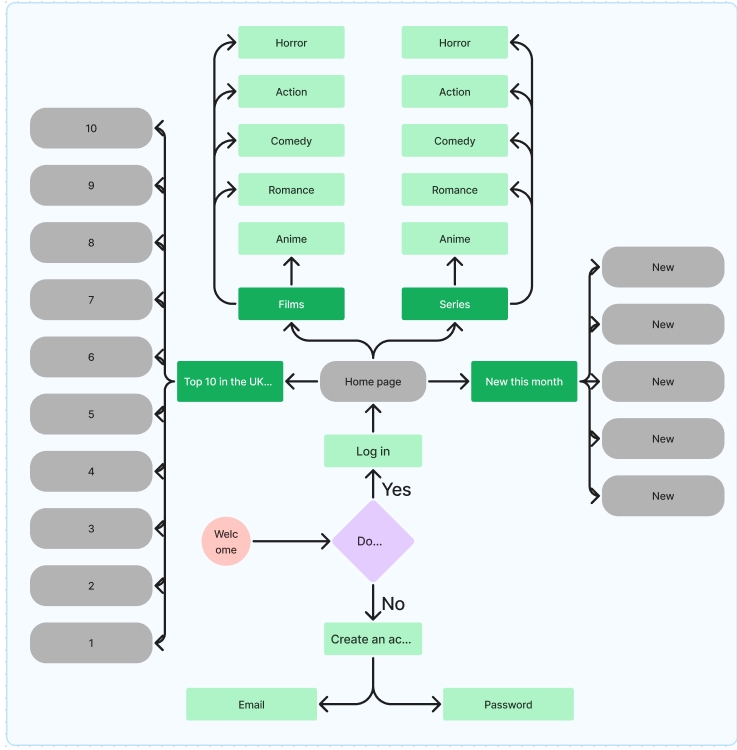
The user flow diagram is to help with the functions of the app/website, since this design will be a responsive one there needs to be a user flow diagram to visually map out actions that will take place in the prototype. The circle is used for the start, the diamond for a question, the rounded rectangles for pages that will appear but the user wouldn’t have to input anything into the prototype for it, and the normal rectangles are used for when the users will have to click onto the prototype and interact with it, like when they need to enter their email or password, or on a section like ‘film’ or ‘series’ that will open up even more sections and actions. This diagram is very helpful to come back to, to remind yourself of what needs to happen in what section and what needs to appear in said section.
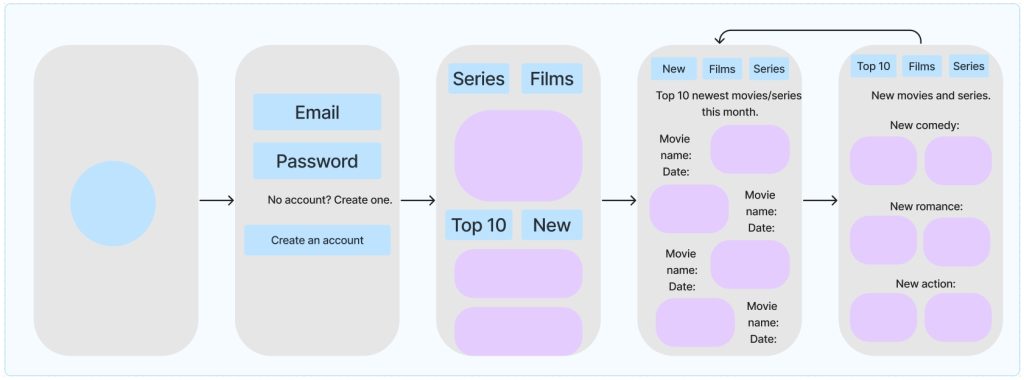
The U.I wireframing is a bit different then a user flow diagram. The U.I wireframing is to help the designer visualise what step comes next and what screen has to change to what and go back to, etc. To start off it’s going to be the logo that is in a circle that will be clicked and it will take the users to the log in page, then when the user presses the log in page the main page will open and then the user can click the four sections, each section taking them to a individual page and the arrows indicate that the page has to rotate back to the menu if the user presses it.
FigJam link: Flow & UI – FigJam (figma.com)